How ChatGPT Users Can Use Codex to Automate Business Work
Most people still think of Codex as a coding tool.
That’s understandable. Codex started as OpenAI’s agent for software development, and it is still heavily used by developers. But that is no longer the full story.
Axios reported that knowledge workers now make up “roughly one-fifth” of Codex users and are growing “more than three times as fast as developers.”
OpenAI is now positioning Codex as a broader productivity tool for knowledge work — not just code. According to OpenAI, people are using Codex to create reports, spreadsheets, presentations, contracts, research outputs, data analysis, workflow automations, and lightweight tools.
For consultants, coaches, founders, agencies, SaaS teams, SMBs, and marketing leaders, that shift matters.
You may not need Codex to write software. You may need it to summarize customer feedback, analyze campaign performance, prepare a client brief, turn messy notes into a report, build a simple dashboard, or automate one recurring workflow that keeps stealing time every week.
Codex is not a magic employee. It still needs clear instructions, review, and boundaries. But if you already use ChatGPT, it may be one of the easiest ways to start moving from “AI that answers questions” to “AI that helps complete real business work.”
Key takeaways
Codex is no longer only for developers; OpenAI is positioning it for broader knowledge work.
ChatGPT users may already have access to Codex through eligible plans, though usage limits vary.
Business users can test Codex on reports, dashboards, campaign analysis, customer feedback summaries, client briefs, and lightweight internal tools.
Codex is best for internal workflow automation. Surfn is better for customer-facing conversations that drive leads, bookings, and conversions.
Start with low-risk workflows you can review before giving AI more responsibility.
Codex Is No Longer Just for Developers
The old mental model was simple: ChatGPT was for general work, and Codex was for coding.
That model is becoming outdated.
OpenAI recently described Codex as “becoming a productivity tool for everyone,” noting that it is increasingly being used across professions to automate routine work and reduce knowledge-work bottlenecks. OpenAI’s report says knowledge workers are using Codex for work products like reports, spreadsheets, presentations, and contracts, as well as research, data analysis, workflow automation, and lightweight tools.
That does not mean Codex has stopped being useful for developers. Coding is still a major part of the product. But the bigger opportunity for many business users is that Codex can help turn scattered business context into useful outputs like summaries, reports, dashboards, briefs, and workflow drafts.
A founder might use it to prepare a weekly KPI recap. A consultant might use it to turn notes and research into a client strategy brief. A marketing leader might use it to analyze campaign results. An agency might use it to draft client reports. A coach might use it to organize program resources or summarize intake materials.
The point is not that every business workflow should move into Codex. The point is that Codex is no longer only worth paying attention to if you write code.
Codex Before vs. Codex Now
Before
Now
Coding agent
Business workflow assistant
Pull requests
Reports and dashboards
Bug fixes
Campaign analysis
Developer workflows
Client briefs and internal tools
Code review
Workflow automation
Why Codex Is Easy to Try if You Already Use ChatGPT
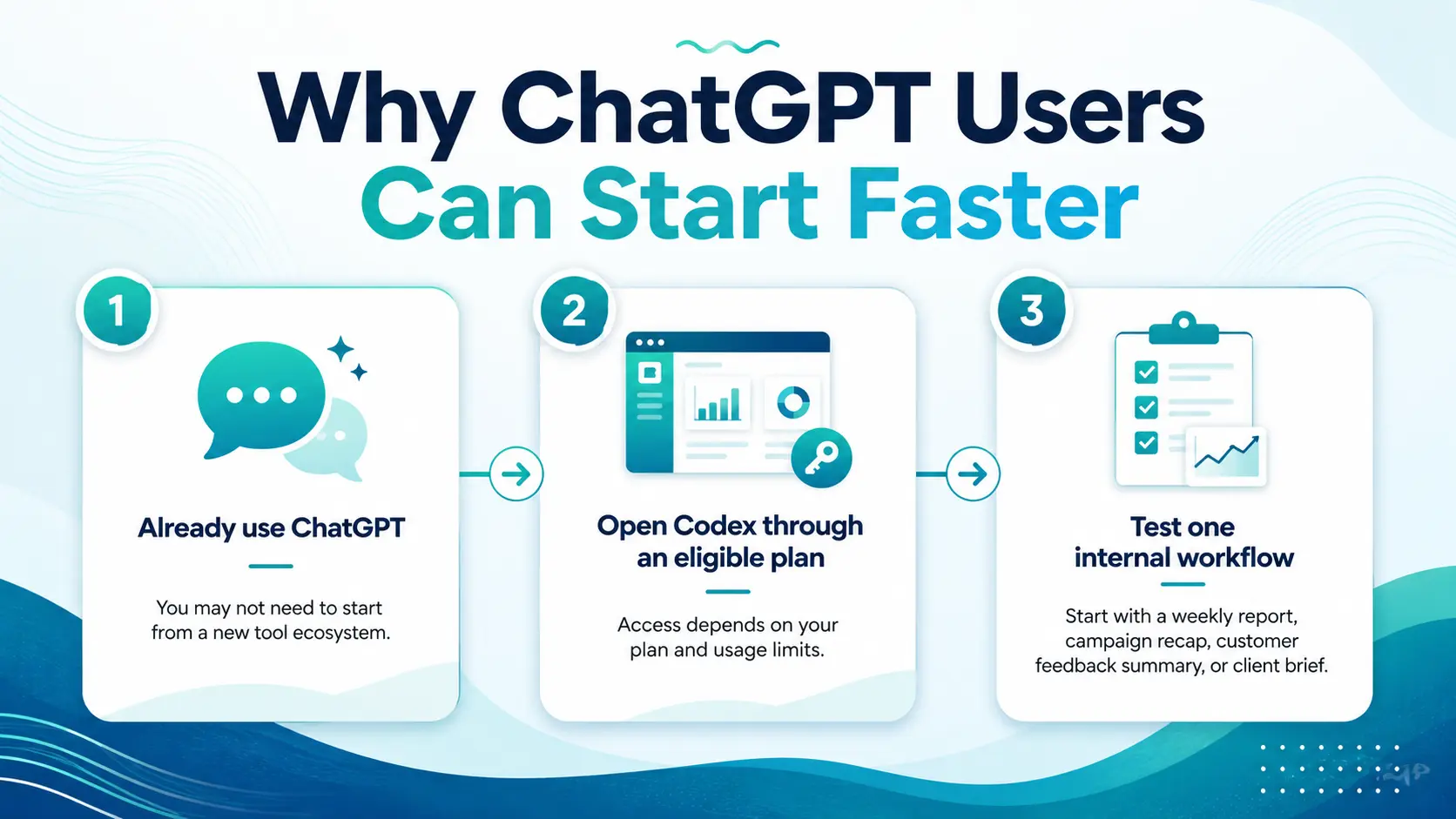
One reason Codex is worth paying attention to is simple: many ChatGPT users may already have access to it.
A solopreneur who already uses ChatGPT for writing can test Codex on a weekly content performance report. An agency owner can try it for campaign recap workflows. A founder can use it to analyze customer feedback or summarize product requests.
Instead of buying a separate automation platform before you know what you need, you can start by testing one internal workflow inside the AI ecosystem you may already use.
What Business Users Can Actually Do With Codex
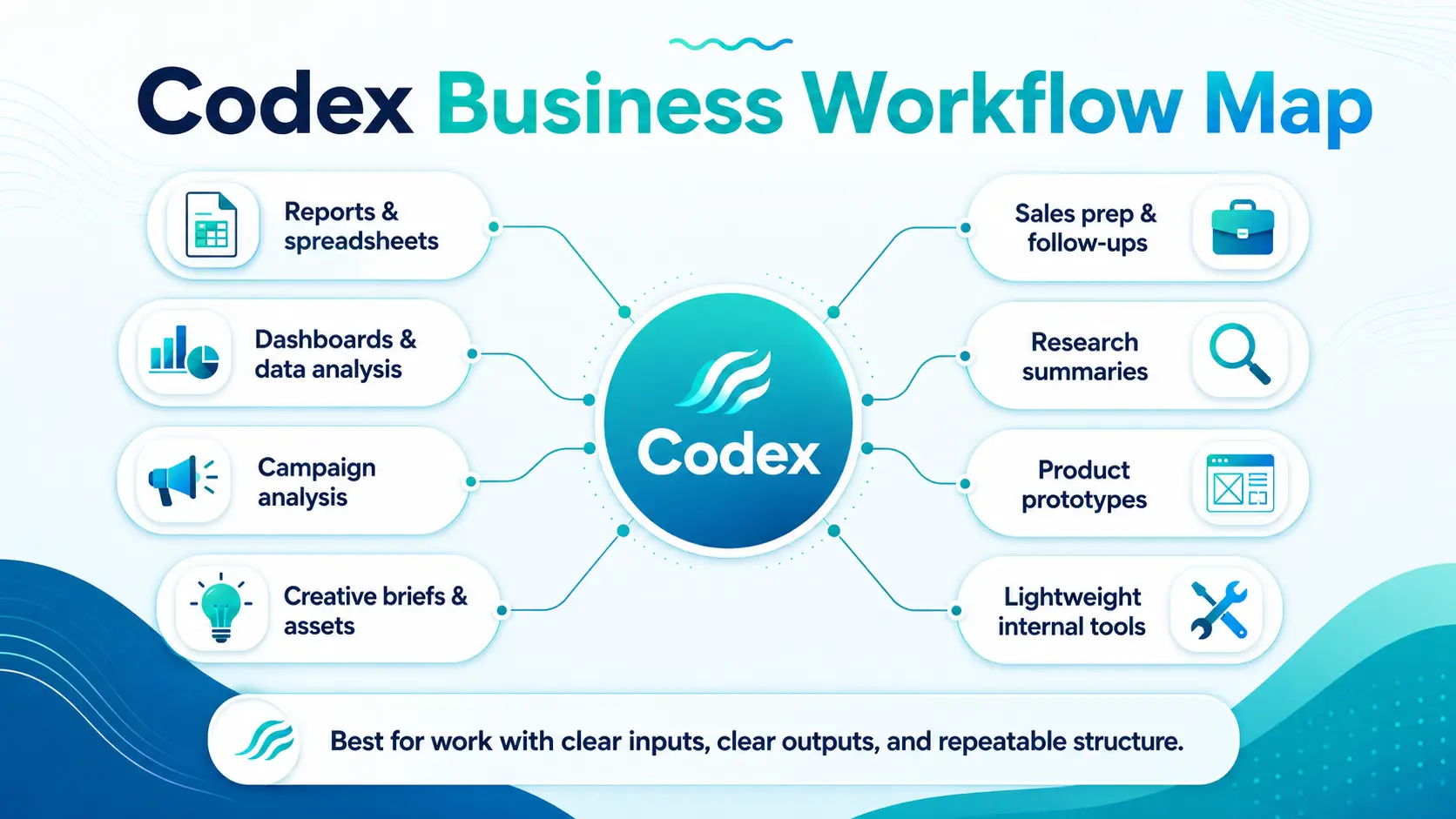
Codex is most useful when the work has clear inputs, a clear output, and some repeatable structure.
For business users, that could mean turning campaign data into a weekly performance summary, converting customer feedback into product themes, drafting a client report from notes, creating a simple dashboard, or building a lightweight internal tool.
OpenAI is already pushing Codex in this direction. Its newer role-specific plugins are designed to help Codex work with the tools, context, and workflows different teams already use. OpenAI has highlighted use cases across data analytics, creative production, sales, product design, investing, and banking.
For a marketing team, that could mean turning a creative brief into campaign boards or ad variations. For a sales team, it could mean preparing for customer meetings, finding account signals, or drafting follow-ups. For a founder, it could mean building a simple KPI tracker or turning product feedback into a prioritized list of issues. For a consultant, it could mean turning discovery notes into a proposal outline or client-ready brief.
The pattern is the same: Codex works best when you give it a focused job, useful context, and a clear definition of what “done” should look like.
It is not a replacement for your judgment. But it can reduce the manual work between raw information and a usable business output.
Practical Codex Workflow Examples by Role
The easiest way to evaluate Codex is to test it on one real workflow, not compare it abstractly.
Start with something recurring, structured, and reviewable. The workflow should have clear inputs, a clear task, and a clear output.
That matches the direction OpenAI is pushing Codex: practical knowledge-work outputs like reports, dashboards, research, analysis, creative work, and lightweight tools.
For a consultant, that might mean uploading a call transcript, client notes, and a website, then asking Codex to synthesize the findings into a proposal outline or strategy brief.
For a coach, it could mean organizing course docs, intake answers, and session notes into a personalized action plan or client resource pack.
For an agency, Codex could help analyze ad exports, creative briefs, and client notes, then draft a campaign recap or creative direction memo.
For a founder, it could summarize a metrics sheet, customer notes, and support themes into a weekly founder dashboard or investor update draft.
For a SaaS team, it could review support tickets, product feedback, and changelog notes to identify recurring issues and prioritize product themes.
For an SMB, it could summarize customer reviews, emails, or internal docs into an improvement checklist, FAQ update, or operations summary.
For a marketing leader, it could analyze campaign metrics, landing page copy, and audience notes to produce a campaign readout with next-test recommendations.
The point is not to hand Codex your entire business. The point is to give it one narrow workflow where the output is useful, easy to review, and worth repeating.
Codex Starter Workflows by Role
Role
Input
Codex Task
Output
Consultant
Call transcript, notes, website
Synthesize findings
Strategy brief
Coach
Course docs, intake answers, notes
Organize and summarize
Action plan
Agency
Ad exports, creative brief, client notes
Analyze and recommend
Campaign recap
Founder
Metrics sheet, customer notes, support themes
Summarize business health
Founder dashboard
SaaS Team
Tickets, feedback, changelog
Identify patterns
Product themes
SMB
Reviews, emails, internal docs
Summarize and organize
Improvement checklist
Marketing Leader
Campaign metrics, page copy, audience notes
Analyze performance
Next-test recommendations
Codex vs. Claude Code / Claude Cowork: When to Use Each
“Choose based on where the work starts: ChatGPT, your codebase, your desktop files, or your business apps.”
Codex, Claude Code, and Claude Cowork all support AI-assisted work, but they are not interchangeable.
Use Codex if you already use ChatGPT and want to experiment with broader business workflows: reports, dashboards, campaign analysis, creative work, sales prep, prototypes, or lightweight internal tools. OpenAI is expanding Codex through role-specific plugins that connect it to the tools, context, and workflows teams already use.
Use Claude Code if your work is coding-heavy. Anthropic describes Claude Code as an agentic coding tool that reads your codebase, edits files, runs commands, and integrates with your development tools.
The simplest rule is this: choose based on where the work starts.
If the work starts in ChatGPT or business apps, Codex may be the easier first test. If it starts in a codebase, Claude Code may fit better. If it starts in messy desktop files, Claude Cowork may be more natural.
Which AI Coworker Should You Try First?
Tool
Best for
Starting point
Codex
ChatGPT users, business workflows, data, apps, creative work, internal tools
ChatGPT or business context
Claude Code
Coding-heavy agentic development
Codebase / terminal / GitHub
Claude Cowork
Local files, documents, desktop workflows, research-heavy deliverables
Desktop files and apps
Important Limits: Don’t Treat Codex Like an Autonomous Employee
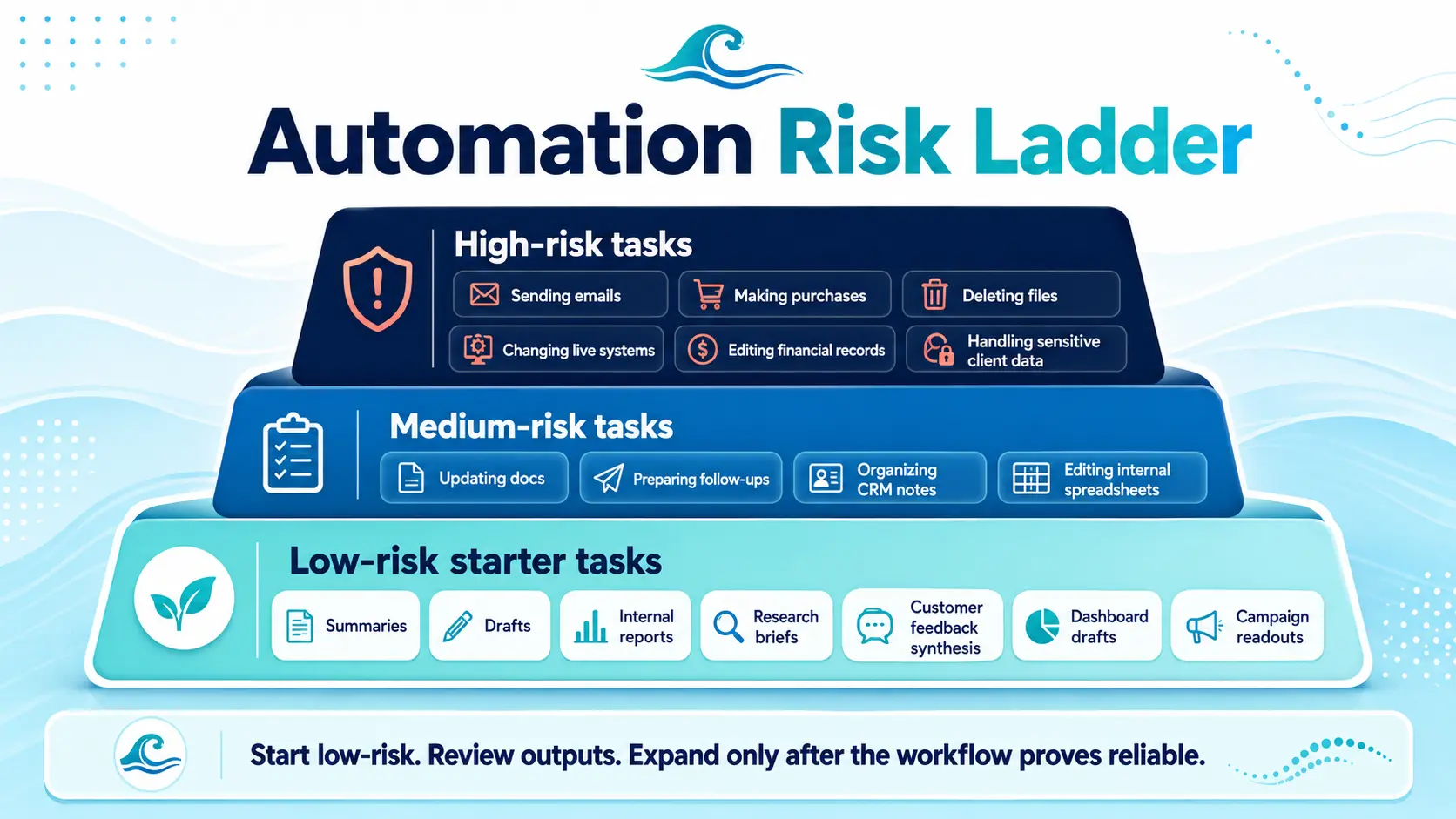
The safest first Codex workflows are useful enough to save time, but low-risk enough to review before they matter.
Codex can help automate business work, but it still needs supervision. Codex can be proactive when you give it scheduled, repeatable work. It can return with findings, summaries, or updates, but it still needs human direction and review.
The safest way to start is with reversible work: summaries, drafts, reports, research briefs, dashboard drafts, customer feedback synthesis, and campaign readouts. These are useful outputs, but they are also easy to review before you rely on them.
Be more cautious with workflows that involve sensitive data, external communication, financial records, file deletion, purchases, or live system changes. Those tasks may eventually be possible in controlled environments, but they should not be your first experiment.
This is especially important with automations. Codex can run recurring tasks and add findings to an inbox, but OpenAI’s docs also make clear that some automation modes depend on the local app, machine, project, or permissions being available. OpenAI also flags elevated risk around fuller access, such as network access.
The practical rule is simple: start with work you can easily inspect, reverse, or correct.
Draft a weekly client update. Summarize customer feedback. Create a campaign readout. Turn notes into a proposal outline. Generate a dashboard draft.
Prove the workflow works before giving AI more responsibility.
Internal Automation Is Only Half the Funnel: Where Surfn Fits
“Codex helps automate the work behind the business. Surfn helps automate the conversations in front of the customer.”
Codex can help you move faster behind the scenes — with reports, dashboards, briefs, research, campaign analysis, client deliverables, and internal tools.
But your prospects do not see your internal workflows. They see your website, landing page, link in bio, email, QR code, ad, or CTA. If they have questions and cannot get answers quickly, they hesitate. And hesitation is where conversions get lost.
Surfn helps businesses create 24/7 conversational AI agents that answer questions, educate visitors, qualify leads, show relevant content, capture information, and guide people to the next step — across websites, links, QR codes, email campaigns, social traffic, and more.
For a consultant, Surfn can help prospects understand your offer and book a call. For an agency, it can help convert campaign traffic into qualified conversations. For a SaaS founder, it can help visitors compare plans, ask product questions, and request demos.
Internal automation helps you operate faster. Customer-facing automation helps you convert more of the attention you already have.
If you’re looking for a 24/7 sales agent powered by Claude, Gemini, or ChatGPT that can live anywhere in your marketing funnel, Surfn might be the best no-code solution.
No. Codex is still heavily used for software development, but OpenAI is also positioning it for broader knowledge work. Business users can explore Codex for reports, dashboards, research, campaign analysis, client briefs, lightweight tools, and repeatable internal workflows.
Can ChatGPT users access Codex?
Many ChatGPT users may already have access to Codex through eligible ChatGPT plans. OpenAI says Codex is included across Free, Go, Plus, Pro, Business, Edu, and Enterprise plans, though usage limits and credit options vary by plan.
What business tasks can Codex automate?
Codex can help with structured business work that has clear inputs and outputs. Examples include summarizing customer feedback, creating campaign readouts, drafting client reports, analyzing data, preparing sales follow-ups, building lightweight dashboards, and organizing research into usable briefs.
Is Codex better than Claude Code or Claude Cowork?
Not across the board. Codex may be the easier first test for ChatGPT users who want to experiment with broader business workflows. Claude Code may be better for coding-heavy workflows, while Claude Cowork may be a better fit for desktop, local-file, and document-heavy knowledge work.
What should I automate first with Codex?
Start with low-risk tasks you can review before they affect customers, money, files, or live systems. Good first workflows include summaries, drafts, internal reports, campaign readouts, customer feedback synthesis, research briefs, and dashboard drafts.
How does Surfn fit with Codex?
Codex helps automate internal business work behind the scenes. Surfn helps automate customer-facing conversations across your funnel, so visitors can ask questions, get guidance, qualify themselves, book calls, and take the next step. Together, they represent two different layers of AI automation: internal productivity and external conversion.