How to Turn Your Link in Bio Into a 24/7 AI Sales Agent
Your link in bio should do more than send people somewhere. It should help them decide what to do next.
In this guide, you will learn how to add a conversational AI agent to your link-in-bio funnel so visitors can ask questions, explore the right offers, and move forward with more confidence.
Your Social Traffic May Not Be the Problem
You are creating content, building an audience, sharing useful ideas, and earning profile visits and clicks.
People are finding you through LinkedIn, Instagram, TikTok, YouTube, X, and other channels. Something you shared caught their attention, so they visit your profile and click the link in your bio to learn more.
That click matters. It means they are no longer passively scrolling. They are curious enough to take the next step.
But interest does not automatically turn into action.
Someone may land on your website, booking page, sales page, checkout page, signup form, or list of links with genuine intent and still hesitate. They may be wondering:
Is this right for someone at my stage?
What exactly is included?
Which option should I choose?
Will this actually work for someone like me?
How much time or effort will this require?
Should I book a call, buy now, or start with something free?
Sometimes, one missing answer is enough to stop the momentum.
The visitor scrolls for a few seconds, opens another page, and skims the copy. They think they will come back later. Then they leave.
Not because they were uninterested. Not because your offer was necessarily wrong. And not because you needed more traffic.
They simply did not have enough clarity to take the next step with confidence.
That is where many social funnels quietly lose conversions: in the gap between interest and action.
For years, businesses have tried to close that gap with stronger copy, longer landing pages, better FAQs, smarter forms, and more calls to action. Those things still matter.
But every static page has the same built-in limitation: it can present information, but it cannot have a conversation.
Think about what happens when you walk into a store and speak with a helpful sales associate. They do not simply hand you a brochure and leave you to figure everything out alone. They ask what you are looking for, answer your questions, explain the differences between your options, recommend what fits your needs, show you something relevant when you need more context, and help you decide what to do next.
A static webpage cannot do that. Even if the information is there, the visitor still has to scroll, search, compare options, and connect the dots alone.
Conversational AI changes that. Instead of sending people to another static destination and hoping they find what they need, you can give them an AI-powered experience that answers questions, understands what they are looking for, and guides them toward the most relevant next step in real time.
Rupali Renjen is the co-founder of Surfn AI, where she builds conversational AI agents that help businesses and creators engage audiences, uncover deeper audience insights, and turn more conversations into growth.
It does not replace your funnel. It makes your funnel conversational.
And one of the best places to start is the link in your bio, because that is often where social attention first turns into real buying intent.
1. Why Your Link in Bio Is a High-Leverage Conversion Point
Your link in bio may be one of the smallest parts of your marketing funnel, but it is often one of the most important.
It is the next step beneath your content on LinkedIn, Instagram, TikTok, YouTube, X, and other platforms. It may also appear in your podcast description, community profile, or email signature.
When someone clicks it, they are signaling real interest. Something resonated enough for them to pause, visit your profile, and learn more. This is where curiosity begins to turn into intent.
But link-in-bio traffic has a specific challenge:
It is often high-intent—but low-patience.
Most visitors are browsing on their phone. They may be scrolling between meetings, watching a short video while waiting in line, or exploring your profile after seeing one useful post.
They are curious, but they are also distracted. They do not necessarily want to navigate through several pages, read a long sales page from beginning to end, or hunt through a website to answer one specific question. They want clarity quickly.
Your bio link might currently send visitors to:
your homepage
a Linktree-style hub
a booking calendar
a sales page
a product page
a course or membership page
a checkout page
a signup form
a free-resource landing page
Any of those destinations can be useful. But they are still one-way experiences.
They can present information, but they cannot ask what the visitor needs, answer a specific question, recommend the most relevant option, or help someone decide what to do next.
Five Common Conversion Leaks
Unanswered questions
A visitor may have one specific question standing between them and the next step. The answer may exist somewhere on the page, but the visitor still has to find it. There is no one there to respond directly in the moment.
Too many options
A homepage or link hub may present several offers, links, and calls to action without helping the visitor decide where to start. More choices do not always create more clarity. Sometimes they create more hesitation.
The same path for every visitor
Every visitor sees the same page, even though they may arrive with different needs and levels of intent. Someone ready to buy should not have the same experience as someone who is still comparing options or looking for a free resource.
High-intent visitors still hesitate
A visitor may be close to booking, joining, or purchasing but still need one more piece of context, proof, or reassurance. If they cannot get it quickly, momentum fades.
Lower-intent visitors leave without a smaller next step
Someone who is not ready to buy may still be open to joining your email list, downloading a guide, or exploring a starter offer. Without an appropriate next step, that interest disappears.
For many visitors, the traditional funnel still looks like this:
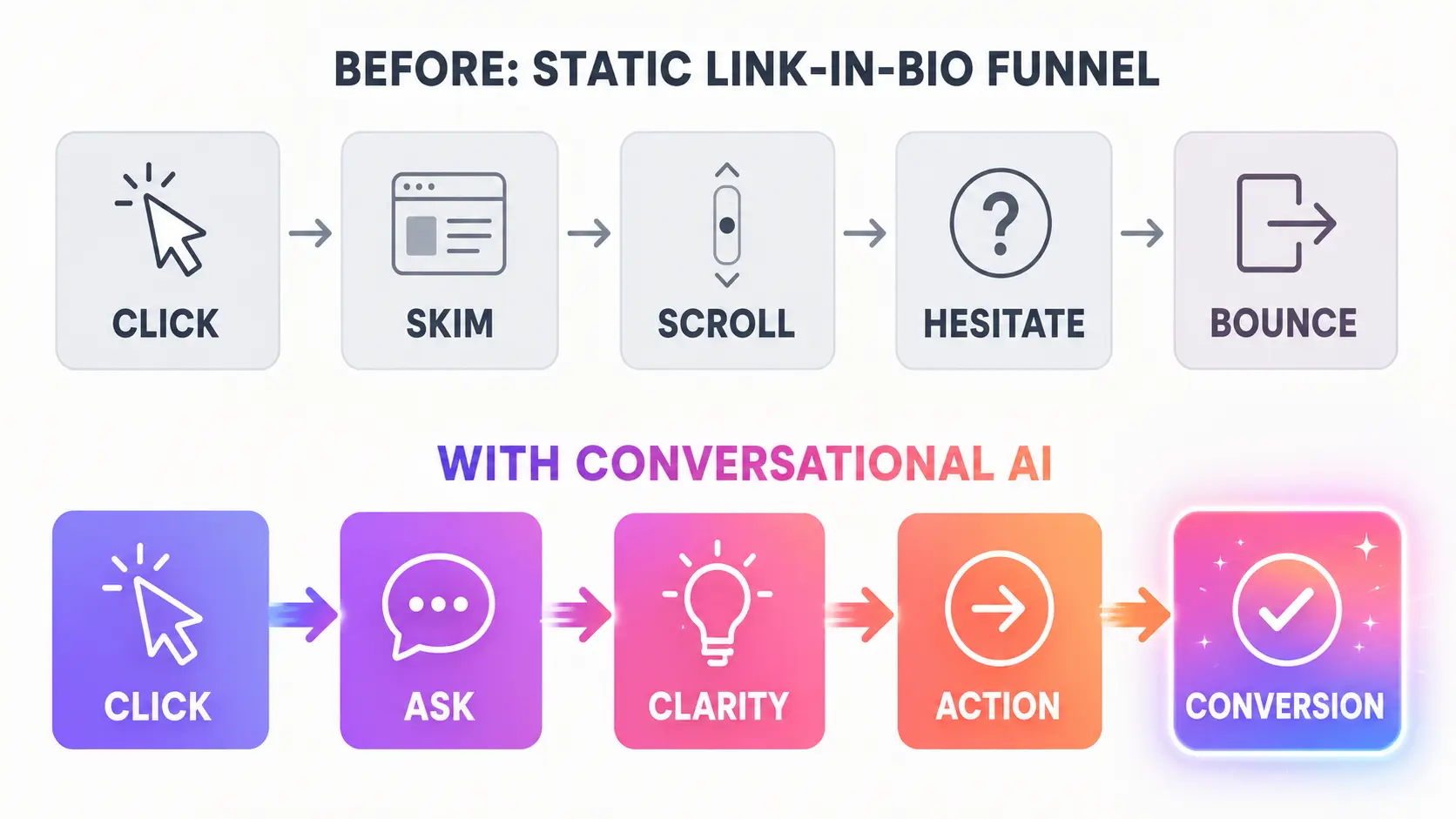
Click → skim → scroll → hesitate → bounce
That is the opportunity.
Your bio link should not simply send people somewhere. It should start a conversation that helps them move forward.
2. What a Conversational AI Agent Changes
A conversational AI agent adds a new layer to your link-in-bio funnel.
Instead of landing on a page and figuring everything out alone, visitors can ask questions, explore their options, and receive relevant guidance in real time. Think of it as a 24/7 guide for your social funnel.
Someone clicks because they are curious about what you offer. The AI agent helps turn that curiosity into clarity before momentum disappears. It can answer questions such as:
Which program is right for me?
What exactly is included?
Do you have an option for beginners?
How could your service help my business?
Where should I start if I am not ready to buy yet?
But the value goes beyond answering questions. A conversational AI agent can also help visitors:
Get the answers they need instantly
Discover the most relevant offer or resource
Receive guidance based on what they share
See proof when it matters
Take a smaller first step if they are not ready to commit
Move toward booking, signup, or purchase when the timing is right
It Does Not Need to Replace the Rest of Your Funnel
A conversational AI agent does not eliminate the pages you already use. It helps visitors navigate them more effectively.
Your AI agent can guide people toward your:
sales pages
booking calendars
checkout links
product pages
course pages
membership pages
signup forms
free resources
A visitor who is ready to act can quickly reach the right checkout or booking link. Someone who still needs context can ask follow-up questions and explore relevant proof. And someone who is interested but not ready to commit can download a guide, watch a video, or join your newsletter.
Instead of expecting every visitor to find the right path alone, you give them a more helpful journey:
Click → ask → clarity → action → conversion
The visitor no longer has to dig through pages, compare options alone, or leave with unanswered questions.
They can simply ask, and your funnel becomes conversational.
3. Three Ways to Use Conversational AI With Your Link in Bio
You do not need to rebuild your entire funnel to make it more conversational.
There are three simple ways to add an AI agent to your link-in-bio experience. The right option depends on your current setup, your audience, and how prominently you want the conversational experience to appear.
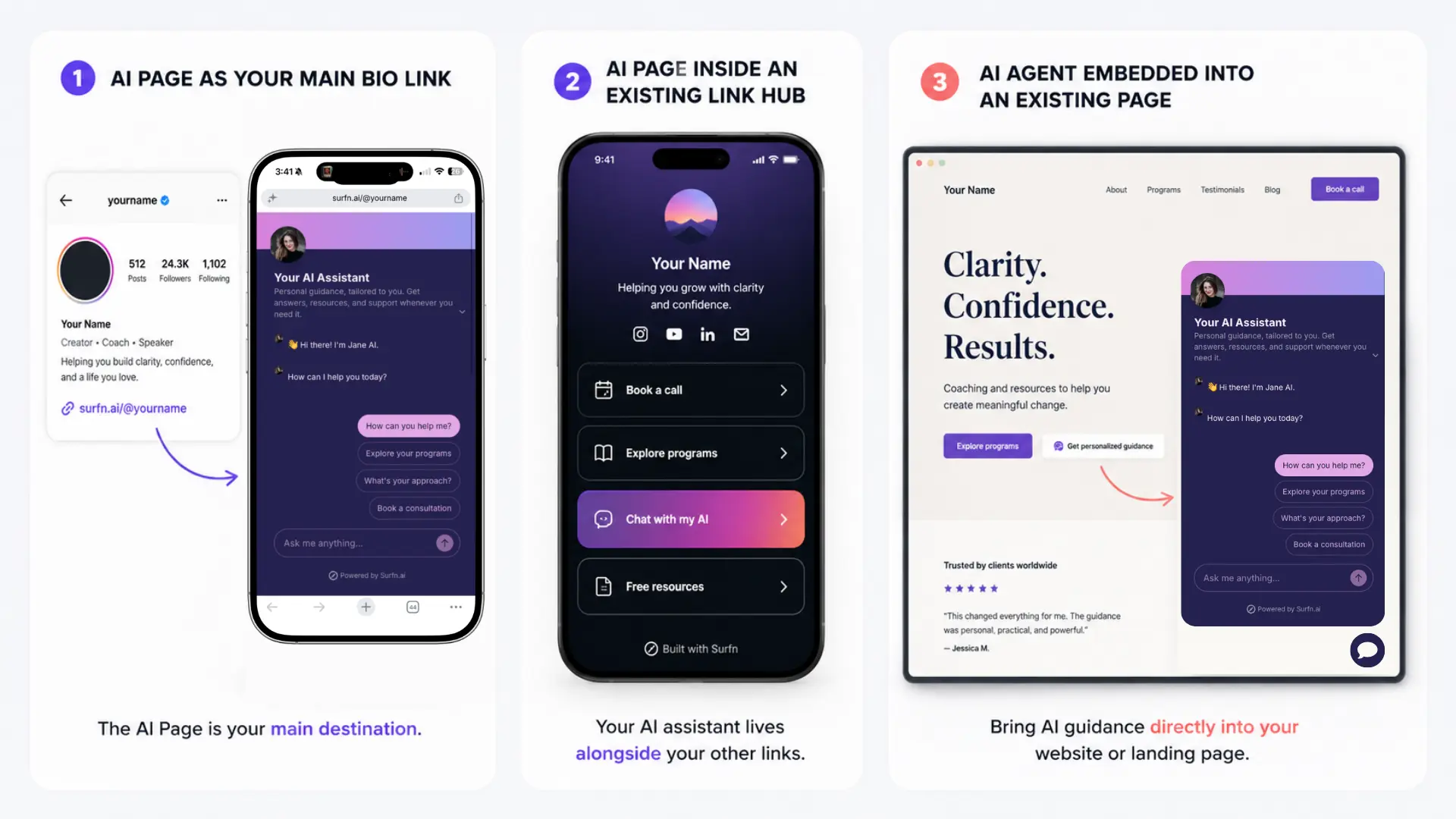
Option 1: Use an AI Agent Page as Your Main Link in Bio
The simplest approach is to make your AI agent page the primary link in your social profiles.
Instead of sending visitors directly to your homepage, booking calendar, sales page, or list of links, you give them one conversational place to start. From there, they can:
ask questions about your offers
learn more about your work
explore relevant products, programs, or resources
find the best place to begin
join your email list
book or purchase when they are ready
This approach works especially well if your audience often needs guidance before choosing the next step.
Option 2: Add an AI Link Inside Your Existing Link Hub
You may already have a Linktree-style page or another link hub that works well for your audience. You do not need to replace it.
Instead, add a conversational option alongside your existing links. For example, you could use a button such as:
Chat with my AI
Get personalized guidance
Find the right option
Not sure where to start? Ask my AI
Have questions before booking? Start here
This gives visitors a choice. Someone who already knows exactly what they want can click the relevant link immediately. Someone who is still unsure can enter a guided conversation and get help deciding.
Option 3: Embed the AI Agent Into Your Existing Page
You may want to keep your current bio-link landing page, sales page, or website. In that case, you can embed the AI agent directly into the experience.
This adds a conversational layer without replacing the page you already use. Depending on your setup, you could add:
a visible inline AI assistant
a popup chat experience
a button that opens a modal
a full-page conversational section
a slider that opens from the side
The right format depends on your page and your audience.
You can also share the same AI link from social posts, stories, pinned comments, DMs, follow-up messages, and email signatures. Start with the placement that already receives the most attention, then expand from there.
4. How to Design a Conversational Link-in-Bio Experience That Converts
Adding an AI agent is not enough on its own. The experience still needs to be designed thoughtfully.
A strong conversational funnel should make the visitor’s journey easier, not create another layer of complexity. The goal is to help people get the information they need and take the most relevant next step with less effort.
Start With One Primary Goal
Begin by deciding what you want the experience to accomplish first.
Your primary goal might be to:
increase bookings
sell a course
drive product purchases
help visitors choose the right offer
grow your email list
promote a membership
deliver a free resource
Do not try to optimize equally for everything at once. Choose one main outcome, then create secondary paths for visitors who are not ready for that outcome yet.
For example:
Primary goal: Help strong-fit visitors book a consultation.
Secondary path: Recommend a useful guide for visitors who need more education.
Fallback path: Invite visitors to join the newsletter.
This gives the conversation direction without forcing every visitor toward the same call to action.
Map Three Levels of Visitor Intent
Different visitors need different paths.
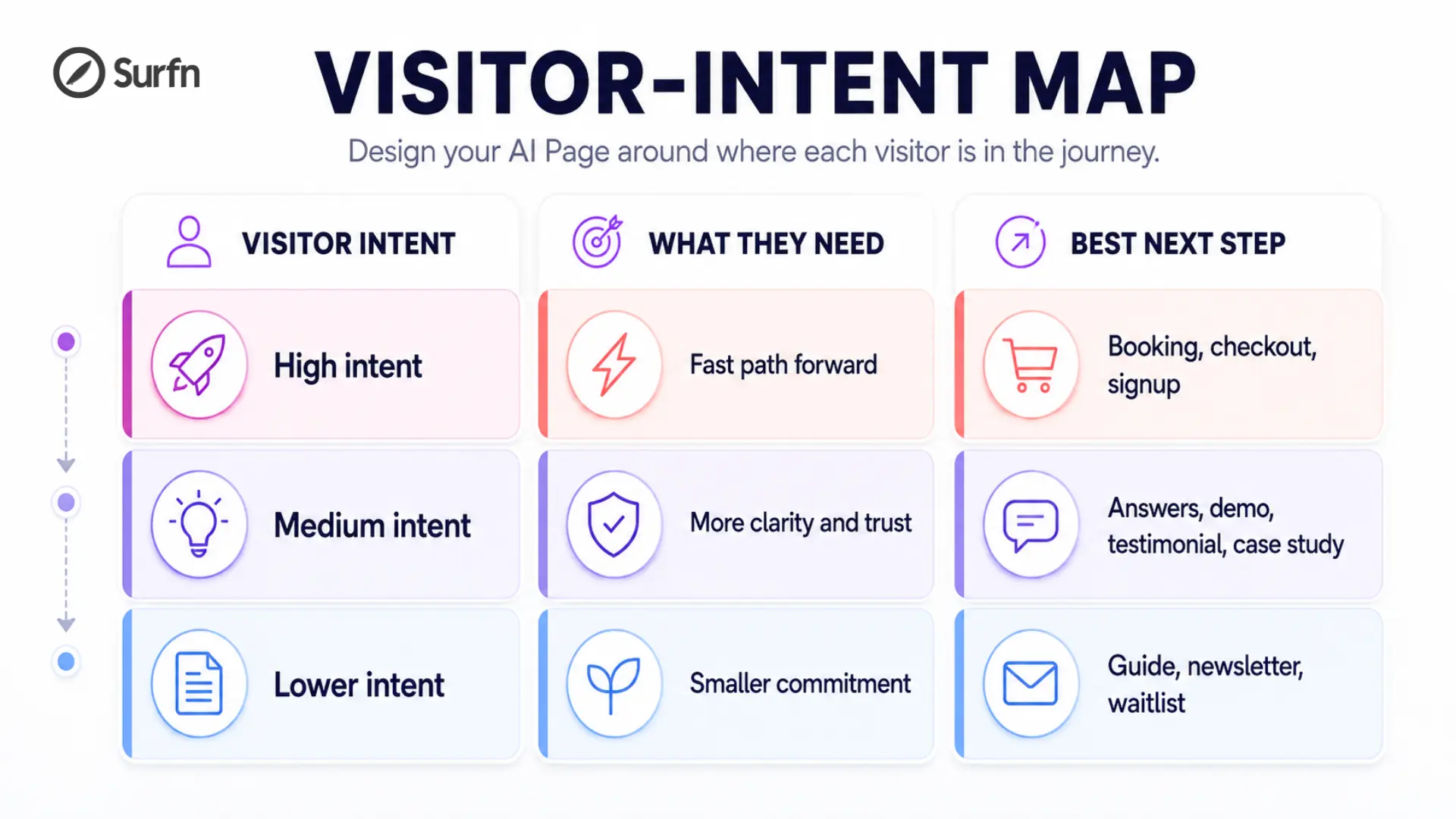
A high-intent visitor may be ready to book, sign up, or make a purchase. Someone with medium intent may still need more context, proof, or reassurance. A lower-intent visitor may prefer to start with a guide, newsletter, or other free resource.
The goal is not to push every visitor toward the biggest conversion. It is to help each person take the most relevant next step.
A smaller conversion today may create a larger conversion later.
Train the AI on the Right Content
Your AI agent should not improvise from generic knowledge. It should respond based on your actual business.
Start with:
core website pages
offer details
FAQs
pricing
booking links
checkout links
free resources
testimonials or case studies
videos or transcripts
brand voice guidance
You do not need to upload everything you have. Focus on the content most likely to affect a decision.
Think about the questions that repeatedly show up in your DMs, comments, emails, and sales calls. Those questions often reveal where hesitation lives and what visitors need before they feel ready to move forward.
Add Three to Five Suggested Questions
An empty chat box can create friction. Many visitors are interested, but they do not know what to type first.
Suggested questions or messages make it easier to begin with one click. Use a small number of useful prompts, such as:
Which option is right for me?
How can I work with you?
What is included?
Where should I start?
Show me your free resources
Avoid greeting visitors with too many choices. The experience should feel simpler than navigating a crowded link hub, not equally overwhelming.
Keep Answers Concise and Useful
Most bio-link visitors are browsing on mobile. They do not want to read a wall of text.
A strong response should:
answer the question clearly
provide one or two useful details
suggest the most relevant next step
For example:
Visitor: Is the course suitable for beginners?
AI agent: Yes. The course starts with the fundamentals and walks you through the process step by step. Most learners spend about two to three hours per week. Would you like to see the course overview or explore the first lesson?
That is enough to give the visitor a clear answer, useful context, and an easy way to continue the conversation.
Surface Proof and Actions at the Right Time
Sometimes visitors do not need more explanation. They need proof.
That may include:
a short demo
a testimonial
a case study
a screenshot
a sample lesson
an image or product grid
a relevant article
a free guide
Do not make visitors hunt for it. Bring the right content into the conversation when it becomes relevant.
Then offer the next action naturally. Depending on the visitor’s needs, that might mean:
showing the enrollment page
opening the booking calendar
displaying the checkout link
capturing an email address
inviting them to join the newsletter
recommending a lower-commitment resource
The timing matters. A booking link shown too early can feel pushy. A free guide shown to someone who is ready to purchase may slow them down.
A strong conversational funnel adapts.
Test the Experience
Before publishing, test the experience. Ask realistic questions, tap every button, and open every link. Make sure the conversation feels fast, clear, and easy to navigate.
Your visitor should not have to work harder than they would on your existing site.
They should have to work less.
5. Three Practical Examples
The concept becomes easier to understand when you see how it works in practice.
The following examples show how a conversational AI agent can support visitors with different levels of intent. In each case, the goal is not simply to answer a question. It is to help the visitor take the most relevant next step.
Example 1: Coach or Course Creator
A coach offers private coaching, a group program, and a self-paced course. A visitor clicks the link in their bio after seeing a social post but does not know which offer fits their stage.
Visitor: I am interested in working with you, but I am not sure where to start.
AI agent: Happy to help. Are you looking for personalized support, a structured program you can follow on your own, or a free resource to get started?
Visitor: Something self-paced.
AI agent: The beginner course sounds like the best fit. It includes a step-by-step framework you can follow at your own pace.
[Course overview and enrollment link appear]
Instead of comparing several pages or guessing which offer is right for them, the visitor receives a relevant recommendation in seconds.
Example 2: Consultant or Service Business
A consultant uses social media to share advice, case studies, and insights. A potential client visits their profile and clicks the bio link because they want to understand whether the consultant can solve their specific problem before committing to a call.
Visitor: Do you work with early-stage SaaS companies that need help improving their positioning?
AI agent: Yes. The consulting offer is designed for companies that need clearer messaging, stronger differentiation, and a more focused go-to-market strategy. Would you like to see a relevant case study or explore whether a consultation makes sense?
Visitor: Show me the case study.
[Relevant case study appears]
AI agent: Would you like to choose a time to discuss your goals?
[Booking calendar appears]
The visitor receives context and proof before being guided toward the booking flow.
Example 3: Creator or Membership Business
A creator runs a paid membership and publishes useful content across social platforms. A visitor is interested but not ready to join immediately.
Visitor: The community looks interesting, but I am still figuring out whether it is right for me.
AI agent: No problem. The membership is designed for people who want structured guidance, weekly support, and access to a growing resource library. I can also send you the free starter guide so you can explore the approach first.
Visitor: I would like the guide.
AI agent: Great. What email should I send it to?
[Email capture form appears]
Instead of losing a visitor who is not ready to purchase, the business creates a smaller next step and an opportunity to continue the relationship.
6. Why Surfn Is Built for Conversational Link-in-Bio Funnels
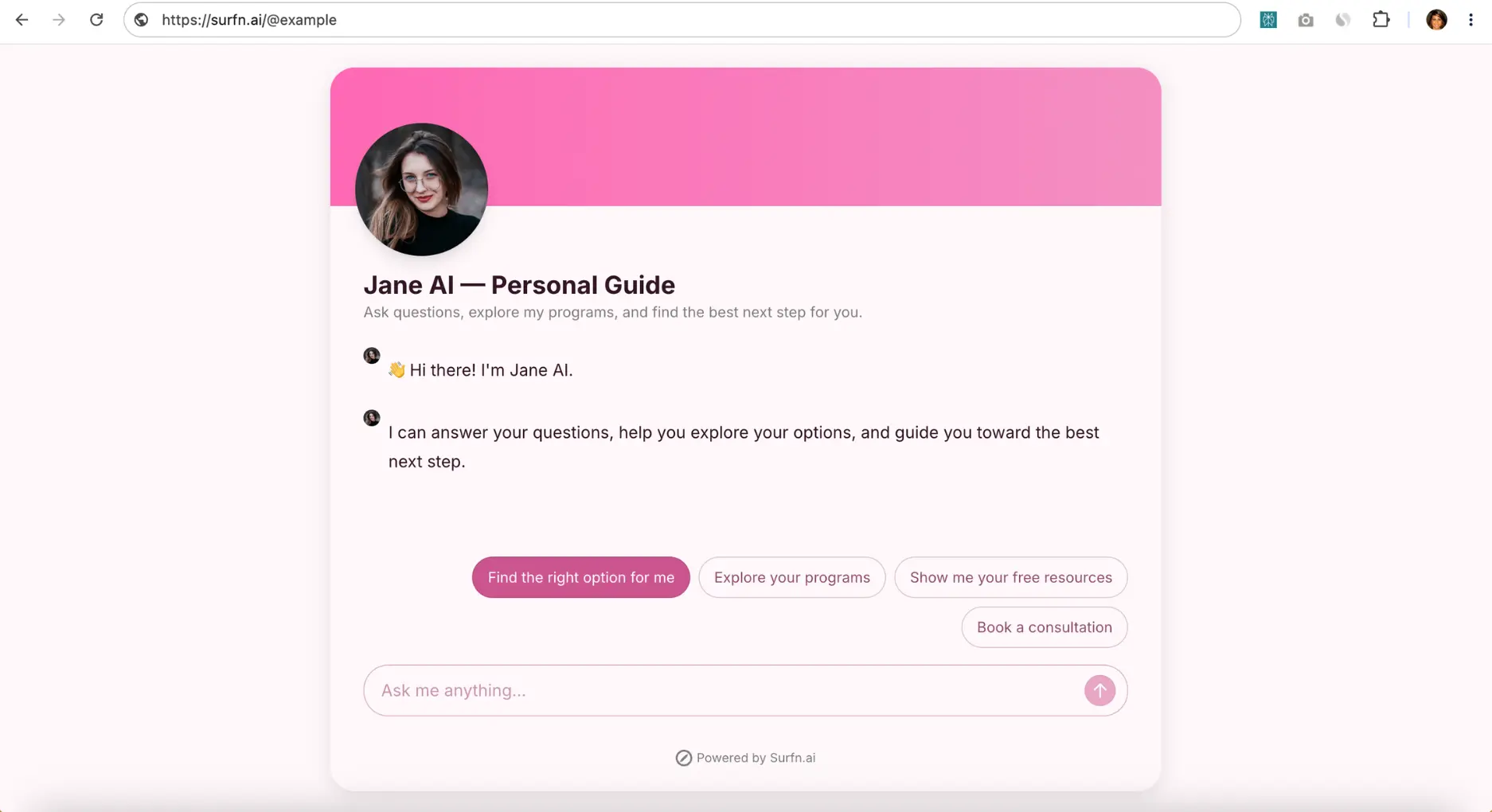
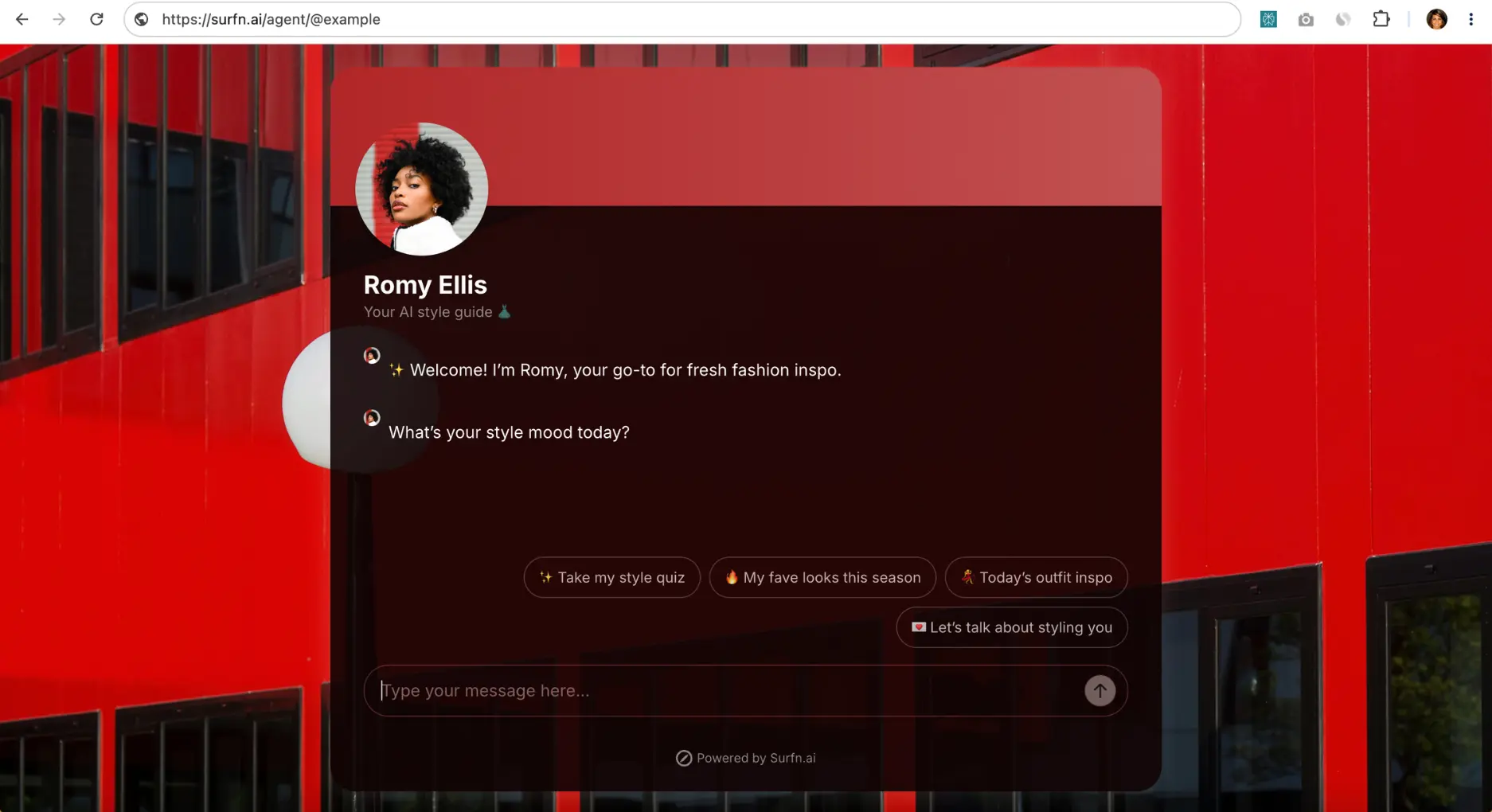
Example of branded Surfn AI Pages: Visitors can ask questions, explore their options, and find the right next step from one conversational link.
Many AI chatbots stop at basic Q&A. They can answer a question, but a helpful sales guide does more than that.
A great guide welcomes the visitor, asks what they are looking for, answers follow-up questions, surfaces the right proof, recommends the most relevant option, and takes action at the right moment to help the visitor move forward.
Surfn was built to bring that kind of guided, action-oriented conversation into your funnel.
With Surfn, you can create a fully branded AI Page powered by your own AI agent. You can share it with one simple link, add it to an existing link hub, or embed it directly into a webpage.
For a link-in-bio funnel, that flexibility matters.
Launch a Fully Branded AI Page With One Link
Your Surfn AI Page can act as the primary destination behind your bio link.
Instead of sending followers to another static page, you give them one conversational place to start. Visitors can ask questions, explore their options, and find the most relevant next step without navigating several pages alone.
You can customize the experience to match your brand, including:
the design
profile image
welcome message
suggested-message buttons
tone of voice
offers and resources
visitor journey
Use your AI Page as your main link in bio, or add it as a button inside your existing link hub.
Add Conversation to an Existing Page
You do not need to replace the page you already use.
Surfn can also be embedded into an existing website or landing page in several formats, including popup, slider, modal, full-page, and inline experiences.
This allows you to add a conversational layer wherever visitors are most likely to need help deciding what to do next. For example, you could embed the AI agent:
directly inside your bio-link landing page
beside your offers
below your FAQ section
behind a Get personalized guidance button
on a sales or booking page where visitors commonly hesitate
Your existing page can still do its job. The AI agent adds a conversation when someone needs more clarity or guidance.
Make It Easy for Visitors to Start
Most visitors do not arrive knowing exactly what to ask.
They may only know that they are curious, uncertain, or trying to find the best place to begin. Surfn lets you add welcome messages and suggested-message buttons so visitors immediately understand how the AI can help.
Instead of staring at an empty chat box, they can click prompts such as:
Which option is right for me?
Show me how it works
Explore pricing
Find the best place to start
Book a call
This reduces friction and gives the conversation direction from the first click.
Keep the Conversation Moving Naturally
After receiving an answer, visitors may still be interested but unsure what to ask next.
Surfn supports AI-generated follow-up buttons beneath replies, helping visitors continue exploring without having to decide what to type after every response.
Someone asking about a course might see:
See what is included
Is this right for beginners?
Compare programs
Watch an overview
Enroll now
Someone exploring a service might see:
See how it works
View a case study
Explore pricing
Book a consultation
These follow-up buttons make the experience feel guided rather than open-ended. The AI helps each visitor continue along the path that is most relevant to them.
Turn Conversations Into Action With AI Tasks
Surfn AI Tasks tell your agent what to do when specific visitor needs or intentions appear.
This is where the experience becomes more than a chatbot.
Your agent can:
ask questions conversationally
capture contact details
understand a visitor’s goals
qualify interest
recommend the right offer
display a relevant video
surface images or product grids
show links and resources
embed a signup form
display a checkout page
present a booking calendar inside the chat
route different visitors toward different next steps
For example, if someone wants to explore a course, the AI agent can explain the offer and show a short overview video. If someone wants personalized help, it can ask a few questions and recommend the most relevant service. If someone is ready to book, it can surface the calendar directly inside the conversation.
And if someone is interested but not ready to commit, the agent can offer a free guide or newsletter signup instead.
The conversation does not end with an answer. It leads somewhere useful.
Qualify Before You Book
You may not want every visitor to reach your calendar.
Surfn can ask questions before displaying the booking flow. Depending on your business, the agent may ask about:
goals
budget
timeline
company size
type of support needed
It can then guide strong-fit prospects toward booking while directing other visitors toward a more appropriate next step, such as a free resource, newsletter, starter offer, or follow-up option.
This creates a better experience for visitors while protecting your time.
More Than a Chatbot
Surfn does not just help your AI agent answer questions.
It helps your funnel have the kind of conversation a great sales guide would: one that educates, builds trust, and takes action at the right moment to help each visitor move forward.
7. How to Launch Your Link-in-Bio AI Agent With Surfn
You can create a useful first version of your link-in-bio AI agent without rebuilding your funnel or writing code.
Start with the information visitors need most, design a clear conversational experience, and test the journey before sending more traffic toward it.
Step 1: Add Your Content
Train your Surfn agent on the information it needs to represent your business accurately.
Depending on your business, that may include:
your website
offer pages
files
FAQs
links
videos
resources
pricing
booking links
checkout links
You do not need to upload everything at once. Start with the content that answers the questions visitors are most likely to ask before they book, sign up, or make a purchase.
Step 2: Customize the Experience
Next, make your AI Page feel like a natural extension of your brand.
Add:
a profile image
a short description
your colors and design
a clear welcome message
three to five suggested questions
relevant content and links
AI Tasks for the actions you want to trigger
Then think through the different paths visitors may need.
For example, decide what should happen when someone wants to:
learn more
explore an offer
see proof
download a resource
join your email list
book a call
make a purchase
The goal is to create a guided experience that helps each visitor move toward the most relevant next step.
Step 3: Share or Embed Your AI Page
Once the experience is ready, place it where your audience already engages with you.
Use your Surfn AI Page:
as your main link in bio
inside your existing link hub
within posts, stories, and DMs
in pinned comments
in email signatures
embedded inside your current page
Start with one placement, such as your main bio link or existing link hub. Then expand based on where engagement is strongest.
Step 4: Test and Improve
Before sending more traffic toward the experience, use the preview to test it from a visitor’s perspective.
Ask realistic questions. Click the suggested prompts. Test the follow-up paths. Open every resource, form, calendar, and link. Make sure the experience feels natural on mobile.
Then publish your AI Page and refine it over time based on the questions visitors ask and the actions they take.
Treat your AI-powered link in bio like a funnel experiment.
The goal is not simply to generate more chats. It is to help more visitors take meaningful action.
A simple measurement framework looks like this:
Clicks → conversations started → key actions → downstream conversions
Track the Full Journey
Traffic and Engagement
Start by measuring how many people reach the experience and begin interacting.
Useful metrics include:
profile-link clicks
AI Page visits
conversations started
visitor engagement rate
suggested-message clicks
follow-up-button clicks
questions asked
A useful engagement metric is:
Conversations started ÷ AI Page visits
This shows how effectively the experience encourages visitors to begin a conversation.
Key Actions
Next, track whether those conversations help visitors move forward.
Depending on your goals, useful actions may include:
email captures
newsletter signups
free-resource downloads
demo views
form submissions
booking-calendar opens
booking clicks
checkout clicks
product-page visits
These actions matter because not every visitor is ready to purchase immediately. A useful AI Page should help each person take the most relevant next step, whether that is booking a call, exploring an offer, joining your email list, or downloading a free resource.
Downstream Conversions
Do not stop at clicks. Track what happens afterward.
Depending on your business, downstream conversions may include:
completed bookings
qualified inquiries
new accounts
purchases
course enrollments
membership signups
revenue
Measure conversion in two ways.
Conversion From Total Visitors
Downstream conversions ÷ AI Page visits
This tells you how effectively the experience converts overall traffic.
Conversion From Engaged Visitors
Downstream conversions ÷ visitors who started a conversation
This helps you understand whether the conversational experience is useful once someone begins interacting.
Both metrics matter. One shows the performance of the full funnel. The other reveals how effectively the conversation helps interested visitors move forward.
Review the Conversations Too
Metrics tell you what happened. Conversations help explain why.
Review the questions visitors ask and look for patterns:
Which questions appear repeatedly?
Where do visitors hesitate?
Which offers are unclear?
What proof do people want to see?
Which resources help visitors move forward?
Where do conversations stop?
Which next steps lead to the most conversions?
These insights can improve more than your AI Page. They can help you strengthen your offers, website copy, FAQs, content strategy, and broader funnel.
The goal is not to maximize the number of messages. It is to make the path from interest to action easier.
9. Early Experiment: Replacing a Static Personal Site With a Surfn AI Page
At Surfn, we have been testing this idea ourselves.
My personal link in bio previously sent visitors to my website. The site explained my background, shared what I was building, and gave visitors several ways to learn more.
But I wanted to test a different experience:
What if visitors could simply ask questions and get guided toward the right next step?
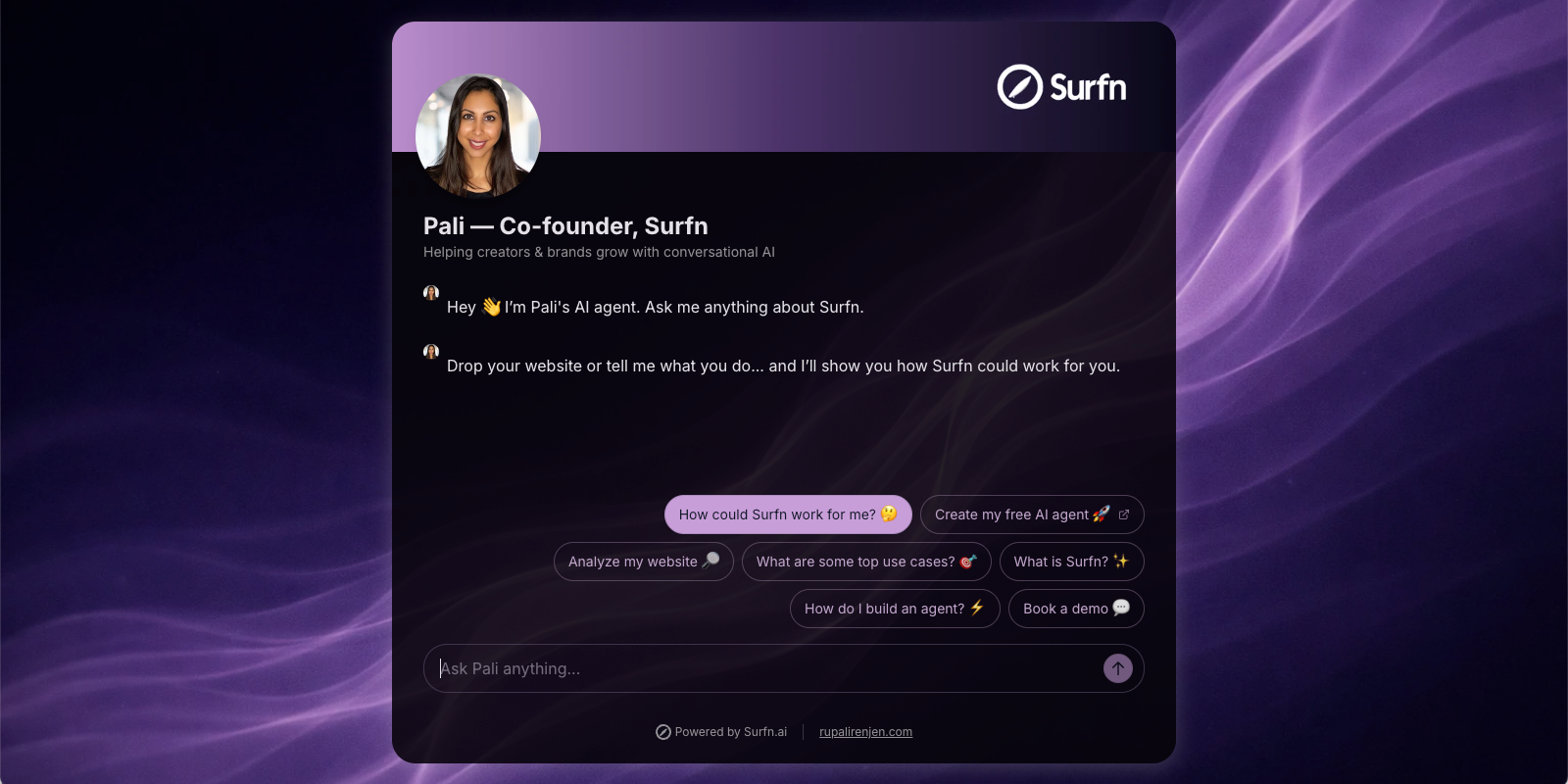
So I replaced my static bio-link destination with a Surfn AI Page.
Visitors can now ask questions about my background, Surfn, conversational AI Pages, relevant use cases, how the product works, and how to get started.
They can also click a suggested question:
How could Surfn work for me?
If someone has a website, they can share the link and receive more relevant recommendations for where conversational AI may fit into their funnel. If they do not have a website, the AI agent can ask a few questions about their goals and suggest useful starting points.
Depending on what the visitor needs, the experience can guide them toward:
creating a free account
watching a short demo
exploring relevant use cases
learning more about the product
taking another appropriate next step
The goal is not to force every visitor toward the same call to action. It is to turn generic curiosity into clarity—and clarity into action.
Try it yourself: Ask my AI how Surfn could work for your business at surfn.ai/@pali →
What We Are Seeing So Far
The experiment is still early. The sample is still growing, and the result should not be treated as a universal benchmark or a controlled conversion study.
But the directional signal is encouraging:
More than 40% of visitors who engaged with the AI Page went on to create a Surfn account.
Results will vary depending on factors such as:
traffic quality
audience fit
offer strength
visitor intent
training content
suggested questions
conversation design
relevance of the next steps
Still, the early result supports an idea worth testing:
When visitors can ask questions, receive relevant guidance, and take action without hunting through several pages, more of them may move forward.
The bio link stopped behaving like a static destination.
It started acting like a conversational conversion layer.
Conclusion: Make Your Social Funnel Conversational
Your link in bio should do more than send visitors somewhere. It should help them decide what to do next.
Static pages still matter, but they cannot have a conversation. They cannot ask what someone needs, answer a specific question, surface the right proof, or take action at the right moment to help a visitor move forward.
A conversational AI agent can.
It can help visitors understand their options, discover the right offer, take a smaller first step when they are not ready to commit, or move directly toward booking, signup, or purchase when the timing is right.
Instead of a path that looks like this:
Click → skim → scroll → hesitate → bounce
You can create a more helpful journey:
Click → ask → clarity → action → conversion
That is the real opportunity: not replacing every page in your funnel, but making your funnel conversational.
Turn Your Link in Bio Into a 24/7 AI Sales Agent
Create your Surfn AI Page free and give every visitor a smarter path forward.